New Semieta Users
New users or logon profiles can be added and taken off the system at any time, meaning you have control over access and what permission level you want to provide to different users.
There are a two distinct user permission levels. You can add more in but these tend to offer the best basic setup:
- The 'Administrator' Role provides full access to all aspects of the program.
- The 'Normal' Role provides a simple, read-only version of the application.
Creating new users;
1. Log in to Semieta Software Suite.
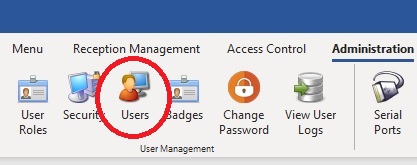
2. Click on the 'Administration' tab at the top of the application.
3. Click on the 'Users' button:
4. A new screen opens with the Admin user profile showing: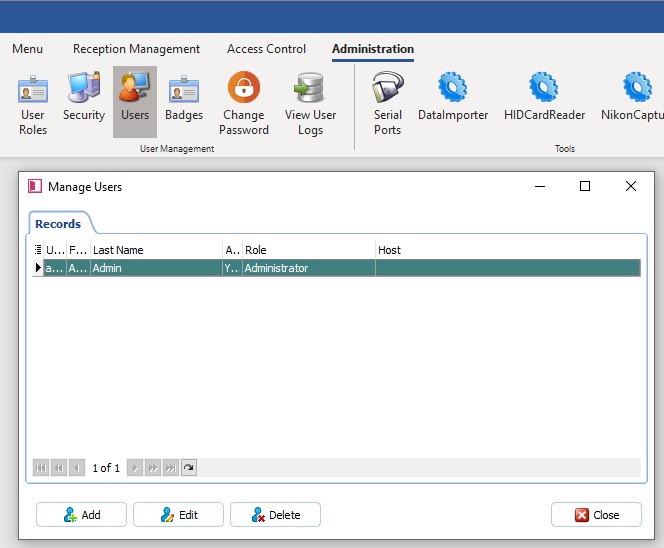
5. Click Add and a new window will open to allow you to create your new user: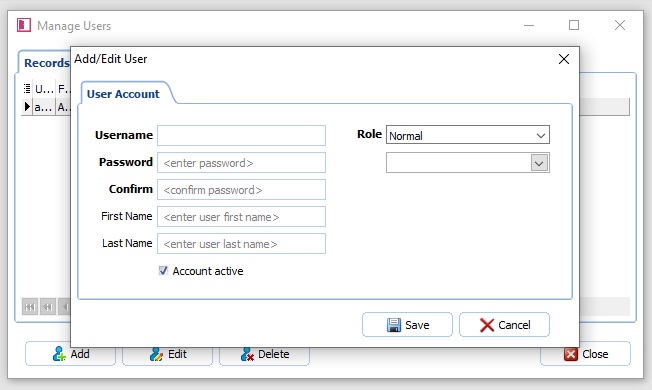
6. Enter a new Username.
7. Enter a Password. The password you set should be a default and a request to the new user should be made to set their own once logged in. There are no minimum requirements for the password complexity.
8. Enter the First and Last name of the new user.
9. You will need to select their Role. As a default, you will have 'Administrator' and 'Normal' available, however you may have others to choose from if you have entered these previously.
10. You will need to associate them with their Host profile. This allows the administrators to track any actions the users take while using Semieta Software Suite.
11. Click 'Save' once you are happy with the details you have entered.