Creating New Logon Profiles
New users or logon profiles can be added and taken off the system at any time, meaning you have control over access and what permission level you want to provide to different users.
There are a two distinct user permission levels. You have the option to add more in, but the default ones tend to offer the best basic setup. The Administrator Role is full access to all aspects of the program, whereas the Normal Role gives no functions for the program but allows you to setup the level that you wish to give to these users.
Creating new users:
- Open Semieta Software Suite (you will need to be using an administrator login)
- Click 'Administration' on the top banner.
- Click Users:

4. A new screen opens with the admin profile showing (as well as any other existing user accounts)
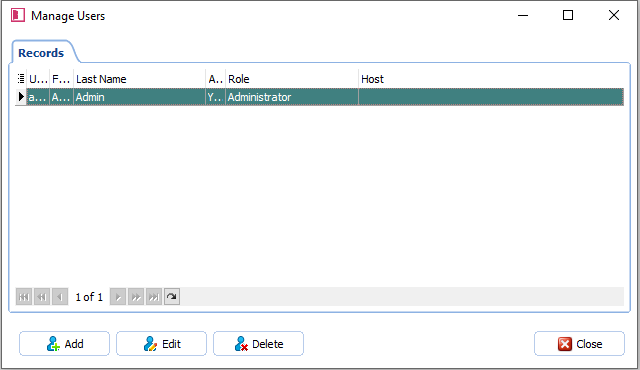
5. Click 'Add' in the bottom left-hand corner and fill in the information into the below window:
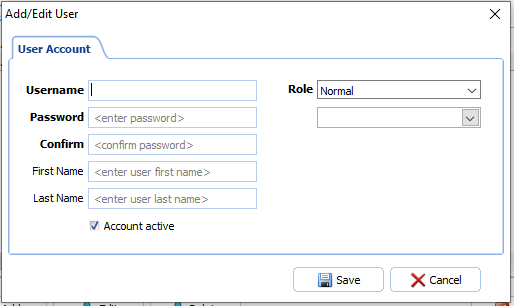
6. Enter a new Username
7. Enter a Password (minimum of 6 characters)
8. Enter their First and Last names (optional)
9. You will need to select their Role by using the drop-down in the top right-hand corner.
10. You can associate the new user with a Host profile in the box underneath (for reporting to a line manager)
11. Click 'Save' after entering the information.
12. Close all the open dialogue windows and exit Semieta.
13. Try logging in with the new profile to check that it works.