Time Schedules
This article is about how to setup time schedules for use with both Controllers and Access Groups.
When setting a Time Schedule against a door, it can either lock or unlock the door for specific days and times. For an Access Group, it will Grant or Deny access for the specific days and times. Below is how to create a Time Schedule:
- Log in to Semieta
- Click on the 'Access Control' tab at the top of the screen.
- Click the 'Time Schedules' button, at which point a new window will open:
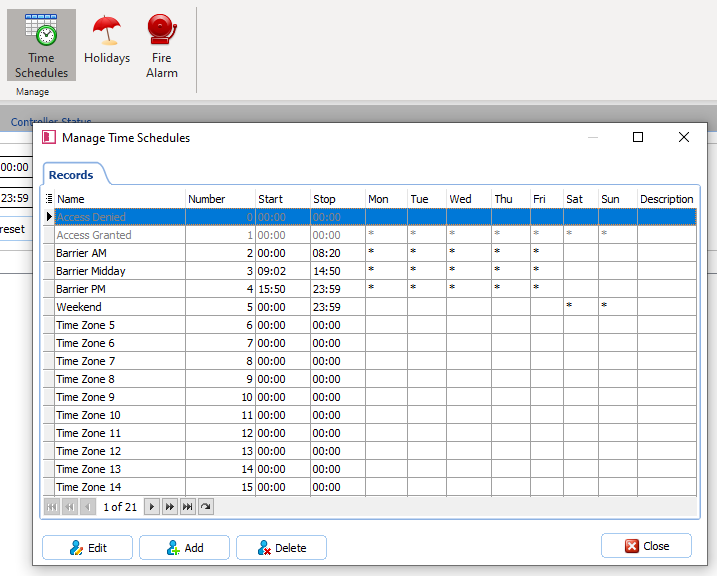
- Click on 'Time Zone 1' and then click 'Edit':
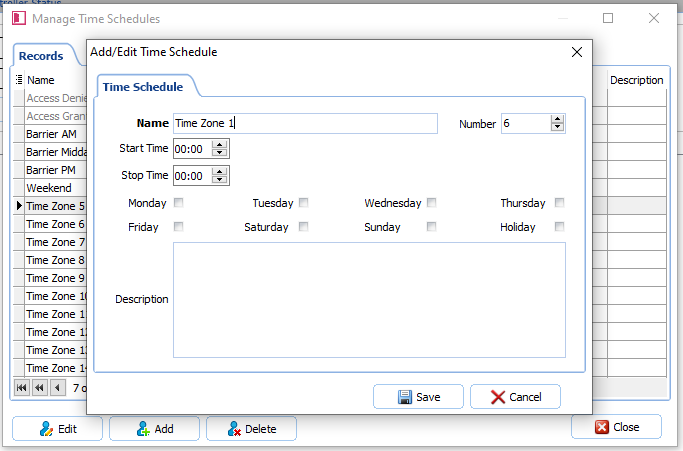
- When the Editing window opens, you will be able to set a logical name for the schedule i.e. Office Hours (for a Time Schedule that allows access Monday to Friday from 0800 to 1830)
- You can now set the start and end time for the schedule (this is when you might want a door to be unlocked or alternatively give access for card holders)
- Next, you need to choose the days that you want the schedule to be active on. This is done by clicking into the check box next to each day:
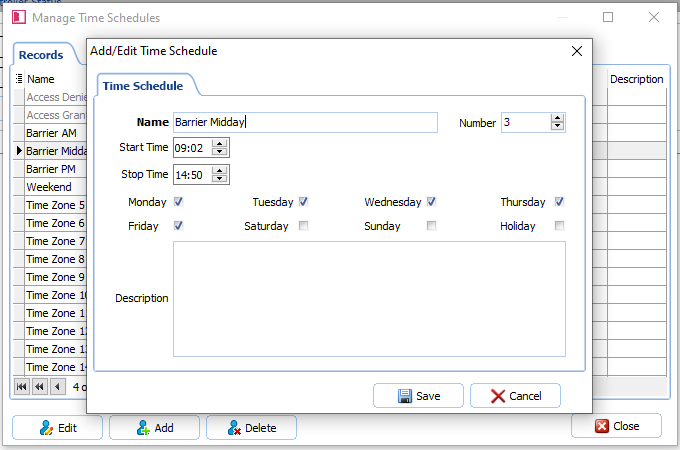
- Click 'Save'
You can repeat the above steps for as many Time Schedules as you may need. It is worth keeping the number of schedules to just the ones you need.
The 'Holiday' checkbox refers to a separate Holiday schedule that can be set up to cover specific time periods, ie Christmas holidays Bank Holidays etc.
If you find that the doors are not opening as you would like, please contact the office to request further support.